Caption styles
Choose a preset or build a custom caption style.
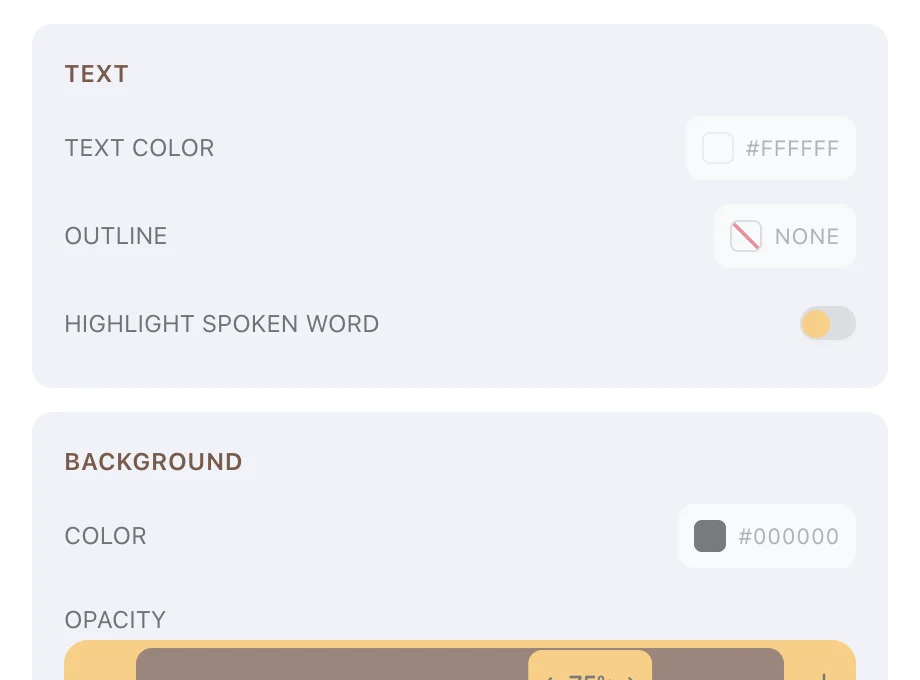
A caption style is one set of look settings applied across the whole edit.
Prism ships three presets, and every setting behind them is open to you.
Anything you change turns the style into a custom one, which behaves slightly differently on vertical outputs.
The three presets
Preset cards sit under Presets on the Style tab of the Captions panel.
| Card | Font | Look |
|---|---|---|
| Basic | Inter, size 42, medium weight | White text on a black bar at 75% opacity, 34 characters per line |
| TikTok | Montserrat, size 56, extra bold | White text with no background, the spoken word highlighted in gold, 20 characters per line |
| Professional | Inter, size 36, semibold | White text on a dark navy bar at 90% opacity, 42 characters per line |
Choosing a card applies it everywhere captions appear, and replaces whatever was set before.
Changing the look
The inspector under Style stays visible below the presets, and every section is editable while captions are on.
- Set the typeface, Size and weight under Font
- Set Text color, Outline, Outline width and word highlighting under Text
- Set the bar Color, Opacity and padding under Background
- Control line length and line splitting under Line breaks
- Set X, Y, Width and alignment under Position
Highlight spoken word colours each word as it is said.
Controls that appear when needed
Three controls stay hidden until they are relevant.
- Outline width appears once an outline colour is set
- Highlight color appears once Highlight spoken word is on
- Pad X and Pad Y appear once background opacity is above zero
Only the outline colour can be cleared, and clearing it shows None.
The ranges
Colours are picked from the swatch or typed as a six-digit hex value.
| Control | Range |
|---|---|
| Size | 12 to 200, in steps of 2 |
| Outline width | 1 to 10, default 2 |
| Background opacity | 0% to 100%, in steps of 5 |
| Pad X and Pad Y | 0 to 64 |
| Characters per line | 8 to 80 |
| New line after pause | 0.1 to 5 seconds |
| X and Y | 0% to 100% |
| Width | 20% to 100%, default 90% |
Custom styles
Edit any setting and a Custom badge appears beside Presets.
The whole configuration is stored, not the difference from the preset you started on.
Clicking a preset card afterwards clears the custom style and returns you to that preset exactly.
Custom styles and vertical outputs
Each preset carries its own adjustments for 9:16, so captions shrink and wrap tighter without you asking.
Custom styles drop those adjustments. Your settings are used as typed, at both aspect ratios.
There is no way to keep the automatic vertical behaviour on a custom style. Set Size and Characters per line yourself once you switch the output to 9:16 — see Vertical video and reframing.
Styles and manual caption edits
A block whose caption lines you have edited by hand keeps those lines when you change the style.
The inspector says so: Blocks with edited captions keep their manual lines — reset them in the Edit tab to apply these settings.
Reset that block in the Edit tab to bring it back under the shared style.
FAQ
Can I use my newsroom's typeface?
Yes, if it is in your brand kit or your account assets. Both appear in the caption font picker.