SOTs and soundbites
Use a speaker's own words in the script.
SOT stands for sound on tape — a quote taken from footage you already have.
A SOT block puts one of those quotes into your script. You do not write it — you find it and drop it in.
Where soundbites come from
Prism finds soundbites when it analyses a video asset. Each one is a span of a single speaker talking, with a transcript attached.
A soundbite has no clip of its own. It plays from inside the original asset, starting where the quote begins.
Browsing soundbites
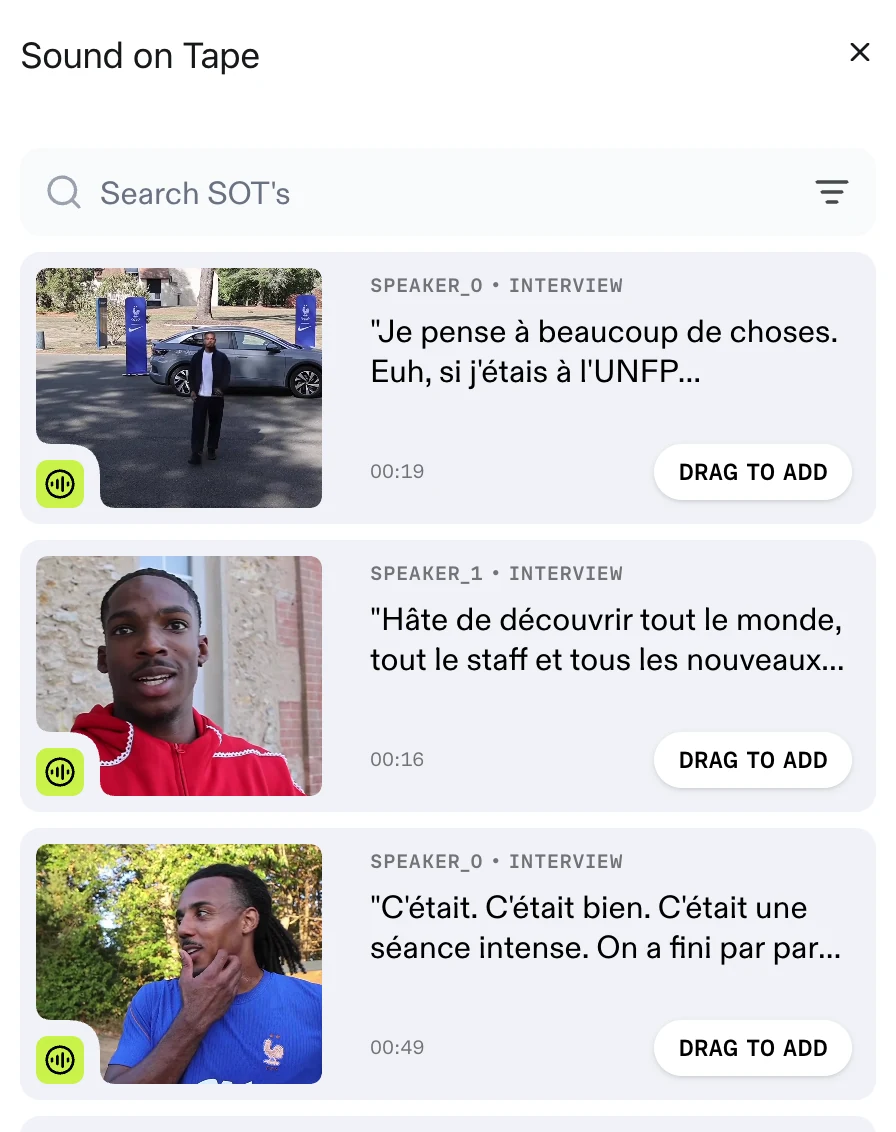
Open SOT in the right rail to bring up the Sound on Tape drawer.
Each card shows a thumbnail, the speaker and category, the quote, and its duration. Where Prism has no name for a speaker, it numbers them instead — SPEAKER_0, SPEAKER_1. Hovering the thumbnail scrubs through the shot.
Type into Search SOT's to narrow the list. It matches three things: the quote's description, its transcript, and the speaker.
Inspecting one before you use it
Click a card to open its details beside the drawer.
There are three tabs — DESCRIPTION, TRANSCRIPTION and DETAILS. Details lists the speaker, the duration, the start and end times, and the type.
Long quotes are shortened in this panel. Read the whole thing on the TRANSCRIPTION tab.
Adding a soundbite to the script
- Open the SOT drawer and find the quote you want
- Drag its card into the script
- Drop it where the purple bar shows it will land
A SOT block is inserted at that point.
Dragging is the only way in. The SOT button in the ADD BLOCK panel does not create a block — it tells you to drag one in instead.
Translated quotes
A soundbite can carry a translation alongside the original. When the video is made in a different language from the speaker's, Prism translates the quote, and the block shows the translated text with the language badged beside the speaker — EN, for example.
Captions follow the translation. Captions covers Translated SOTs only, which captions translated soundbites and nothing else.
FAQ
Can I change the words in a soundbite?
No. The quote is what the speaker said, and there is no way to type over it.