Editing Suite
Where an edit is arranged and refined.
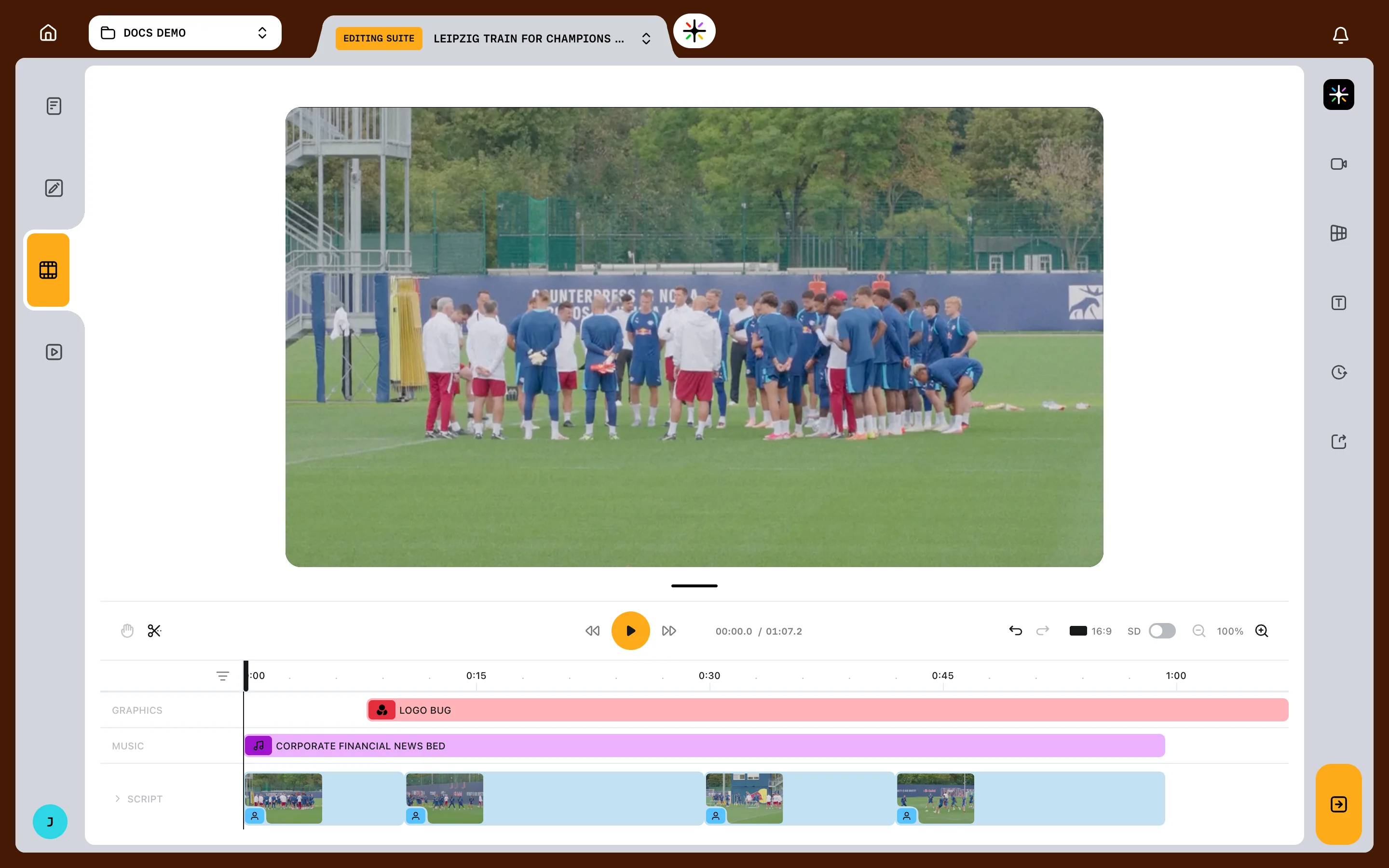
The Editing Suite is the Video Editor tab in the workspace.
It opens once an output has a committed script and audio for every block. Until then it stays locked — see Your first video.
The screen has three regions: a preview player in the centre, a timeline across the bottom, and panels down the right edge.
What is on screen
| Area | What it holds |
|---|---|
| Preview player | The edit as it currently stands |
| Control bar | Playback, the blade tool, undo, zoom and preview settings |
| Timeline | Every track and clip in the edit |
| Right sidebar | The icons that open the panels |
| Properties panel | Opens to the left of the player when one clip is selected |
Drag the handle between the player and the timeline to give the timeline more room. That height is not remembered — it resets when you navigate away.
Panels
Panels open from the right sidebar: Library, Elements, Captions, Versions and Export. On Enterprise plans an AI Editor panel sits above them, for asking Prism to change the edit in your own words.
Only one is open at a time.
Library and Elements hold media you drag onto the timeline, and their cards carry a Drag to Add hint.
Playing the edit
Use the transport controls in the bar beneath the player to play, pause and seek.
The read-out in the control bar shows the current time and the total, to a tenth of a second.
Two settings there change the preview only. HD and SD pick preview quality, and the aspect toggle switches between 16:9 and 9:16. Renders always use full resolution.
Moving around the player
Scroll over the white space around the player to pan it.
A percentage badge appears in the corner once you have moved or zoomed. Click it to reset both.
Previewing one clip
Click a footage or SOT clip in the timeline and the player shows that clip alone, ringed in orange.
The control bar becomes a source trim bar for that clip, and the rest of the timeline dims.
Clicking a clip in the player canvas does something different: it opens that clip's properties without isolating the preview. Trimming and splitting covers the source trim bar.
Timeline settings
The filter icon above the track labels opens five toggles. Prism remembers your choices in this browser.
| Setting | Default | What it does |
|---|---|---|
| Show locked tracks | On | Shows locked block-level tracks |
| Snap to edges | On | Clips snap to neighbouring edges as you drag |
| Enlarged tracks | Off | Makes the narrow track rows taller |
| Show block dividers | Off | Draws a line at each block boundary |
| Preview on hover | Off | Seeks the player to whatever you point at |
Preview on hover stays quiet while the edit is playing, while a clip preview is open, and while the blade tool is on.
FAQ
Why does Prism say the video edit is still being generated?
It is still building the edit from your script. The Editing Suite opens once that finishes.